
Doo AI: an AI to-do list you can talk to
Say what needs doing, the way you'd tell your team. Doo AI turns it into tasks with the right people, dates and reminders, in the right list. It also plans your day and catches you up on what you missed.
The free plan includes 200 AI credits a month · iPhone, Android and web


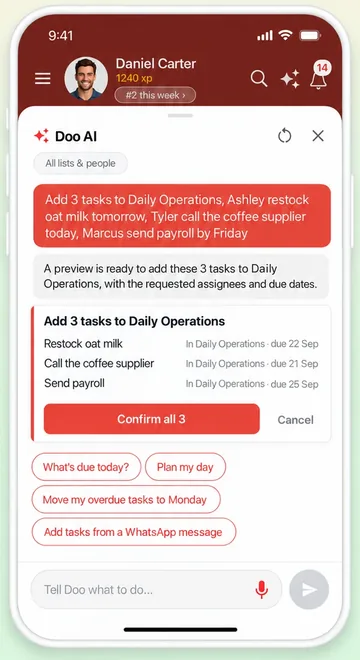
Stop typing out every task
You know what the team has to do today. The slow part is writing it all down: one task at a time, choosing who does it, setting the date, adding a reminder. So the list stays in your head, or in a WhatsApp message nobody can find by lunchtime.
Doo AI does the writing for you. Say it or type it in one go, check what it understood, and the tasks are in your list.
What Doo AI can do
Doo AI is built into WeGoDoo, so it works with your real lists, your team and your dates. These are the things people use most.
Ask Doo, in plain words
Open Doo and ask the way you'd ask a colleague. It finds the answer, or makes the change: it adds and assigns tasks, sets dates and reminders and ticks things off.
- What's overdue in Café Team?
- Who has the most open tasks this week?
- Assign the fridge check to Alex
- Push my overdue tasks to Monday
When you add several tasks at once, paste in a message or change a lot of tasks, Doo shows you a preview first. Nothing changes until you confirm.
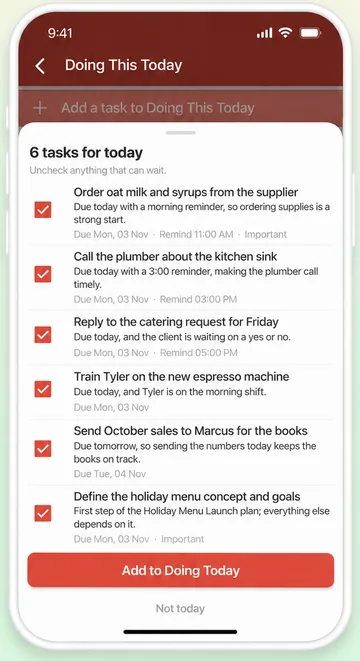
Plan My Day
Doo looks through your tasks and suggests up to 15 for today, each with a short reason: it's due today, a customer is waiting, or other work depends on it.
Untick anything that can wait, then add the rest to Doing This Today in one tap.
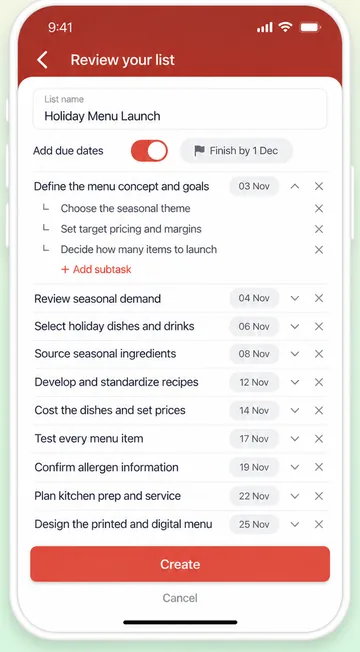
Create a list with AI
Describe a goal, like launching a holiday menu, and Doo AI writes a checklist of 10 to 20 tasks. Add subtasks, switch on due dates or ask for changes.
Nothing is saved until you press Create, so you can fix anything first.
Add a task by speaking or typing
Say “Call the bakery about Saturday's order tomorrow at 9am, remind me” and the date and reminder fill themselves in. Check the card, then add the task.
Catch Me Up
Back after a day off? Catch Me Up reads what happened in your lists and tells you what changed and what needs you.
Search by asking
Type or say what you're looking for, like “overdue tasks assigned to Tyler”, and the filters set themselves.
Turn a message into tasks
Paste a message from a supplier or a customer into Doo, and it suggests the tasks for you to confirm.
Step-by-step guide with screenshots: What is Doo AI and what can it do?
Speak in English, Hindi or Hinglish
When you add a task by voice, talk the way you talk to your team: in English, Hindi or Hinglish. WeGoDoo writes the task in English.
You stay in charge
Off until you turn it on
AI features stay off until you say yes, and each person decides for themselves. You can turn them off again anytime in Settings.
A preview before big changes
Doo makes up to 3 small changes straight away. Anything bigger shows a preview first, and nothing changes until you confirm.
Some things stay with you
Doo can't delete tasks or lists, share a list, invite people or touch your plan and billing.
Your tasks never use credits
Credits are only used when the AI does the work. If you run out, your tasks, lists and reminders keep working as usual.
Doo AI uses AI models from outside providers, and section 6A of our privacy policy names them. When you use it, WeGoDoo sends only what is needed to answer, such as what you typed or said and the related tasks.
AI credits on every plan
Doo AI runs on credits, and every plan gets a new batch each month: 200 on Free, 2,000 on Pro and 3,000 per person on Business. Adding a plain task or searching by name never uses credits.
What each action uses: How do AI credits work? · Plans: pricing page
Already use Claude?
Connect Claude to WeGoDoo and work with your lists from inside Claude: ask what's due today or what's overdue and, with write access, add tasks or tick them off. Connected AI apps come with Pro and Business.
Set it up in about two minutes: How to connect WeGoDoo to Claude
Try it on a list right now
No account needed: our free AI tools write a task list from any topic, or break one big task into steps. When you like the result, run it with your team in WeGoDoo.
Questions about Doo AI
What is Doo AI?
Doo AI is the AI helper built into WeGoDoo. Ask Doo in everyday words and it finds your tasks, sums things up or makes the change for you. Doo AI also powers Plan My Day, Catch Me Up, Create list with AI and adding tasks by voice.
Can I add tasks by voice?
Yes. Tap the microphone in the Add a task box, on the web or the phone, and say the task. WeGoDoo fills in the date, the reminder, the person and more, and shows you a card to check before the task is added.
Does Doo AI understand Hindi?
Yes. When you add a task by voice, you can speak in English, Hindi or Hinglish. WeGoDoo writes the task in English.
Is Doo AI free?
Every plan includes AI credits each month: 200 on Free, 2,000 on Pro and 3,000 per person on Business. Adding a plain task or searching by name never uses credits, and if you run out, your tasks, lists and reminders keep working.
Can Doo AI delete or change my tasks?
Doo can add, complete and assign tasks, set dates and reminders, mark tasks Important and more. It makes up to 3 small changes straight away and shows a preview for anything bigger. It can't delete tasks or lists, share a list or change your plan.
What happens to my data?
AI features stay off until you allow them. When you use them, WeGoDoo sends the AI provider only what is needed to answer, such as what you typed or said and the related tasks. You can turn AI features off anytime in Settings, AI features. Section 6A of our privacy policy names the providers and has the details.
Does it work on iPhone, Android and the web?
Yes. Doo AI works in the WeGoDoo apps for iPhone and Android and in the web app at app.wegodoo.com. On the web you type to Doo; on the phone you can also speak to it.
Say it once. Doo AI does the rest.
Start free, turn on AI features, and tell Doo what needs doing today.
Start free