
Task verification app with photo proof
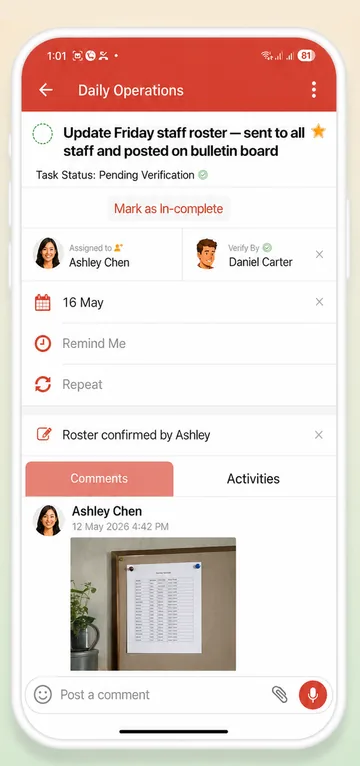
Pick who checks each task. When your teammate finishes, they can post a photo in the task, and it waits as Pending Verification until the checker marks it verified. No chasing, no “is it done yet?” messages.
Free plan available · iPhone, Android and web


“Done” should mean done
A ticked box tells you someone pressed a button. It doesn't tell you the room was cleaned, the stock was counted or the report adds up. So you chase: you call, you walk over, you send one more WhatsApp.
WeGoDoo adds one simple step instead: a second person checks the work before the task closes. Your team knows the standard, and you only step in when something needs fixing.
How task verification works
Three steps, on any task in a shared list. Nothing to set up first.
-
Choose who checks it
Open a task and pick a list member in Verify By: the manager, the supervisor, or whoever signs the work off. Or switch on Task Verification Mandatory for the list, and whoever creates a task checks it.
-
Your teammate does it and shows it
They post a photo in the task's comments (the clean room, the full shelf, the signed delivery note) and mark the task complete. The checker is notified.
Pending Verification -
The checker signs it off
They look at the proof and tap the task's tick to verify it. If something's missing, they tap Mark as In-complete: the task goes back and your teammate is notified.
Verified ↩ Back to your teammate
Step-by-step guide with screenshots: How to add a verifier to a task
Why teams use verification
No awkward follow-ups
Tasks waiting for a check show Pending Verification, and you can sort or filter a list by it, so nobody has to ask “did you do it?”.
Proof stays with the task
Photos, notes and comments sit on the task itself, not in a group chat that scrolls away by lunchtime.
A record you can look back on
Each task's activity history shows what changed and when, so you can see who did the work and who checked it.
Fair for everyone
One standard for the whole team, and good work gets noticed instead of assumed. Checkers even earn the Quality Controller badge.
Where a second check pays off
Verification helps wherever you can't see every job for yourself: on the floor, on site, or on someone else's desk.
Restaurants and cafés
Opening and closing checks, deep cleans, fridge temperatures and stock counts.
Hotels and housekeeping
Rooms ready for the next guest, and maintenance jobs signed off when they're fixed.
Cleaning and maintenance
A photo of every finished job, checked before you invoice the client.
Shops and retail
Displays set up, deliveries received and shelves restocked before opening.
Office and back office
Reports, payments and filings reviewed by a second person before they go out.
“Thanks to WeGoDoo's task verification feature, our team at Swan Sweets Pvt Ltd is more accountable than ever. An essential app for any business!”
Need the checklist first?
Write it in seconds with our free AI tools, then add each step to WeGoDoo with a verifier.
Questions about task verification
What is task verification?
Task verification adds a check before a task counts as done. In WeGoDoo you choose a Verify By person for a task in a shared list. When the assigned teammate completes it, the task shows Pending Verification until that person marks it verified, or marks it in-complete if the work isn't right.
Who can verify a task?
The person in Verify By. That can be any member of the shared list except the person doing the task, and the list owner and admins can verify too. Or turn on Task Verification Mandatory for the list, and whoever creates a task becomes its verifier.
Do I have to add a photo?
No, photo proof is optional. When the result needs to be seen, such as a clean room or a stocked shelf, ask your team to post a photo in the task's comments. In the mobile app they can take it with the camera without leaving the task. For other tasks a note is enough.
What happens if the work isn't good enough?
The checker taps Mark as In-complete and adds a comment saying what's missing. The task goes back to your teammate, who gets a notification, and it comes back for checking once it's done again.
Is task verification free?
Yes. Verification works on every plan, including Free, in any shared list. The free plan allows 3 lists and 3 attachments a day; Pro raises those limits. See the pricing page for details.
Does it work on iPhone, Android and the web?
Yes. Verification works in the WeGoDoo apps for iPhone and Android and in the web app at app.wegodoo.com, and every change syncs across them.
Stop chasing. Start verifying.
Set up your first shared list in a couple of minutes and add a verifier to the tasks that matter.
Start free