
A simpler Connecteam alternative for team tasks
Connecteam is an all-in-one app for frontline teams: time clock, scheduling, chat, HR and tasks. If all you need is your team's tasks done and checked, WeGoDoo does just that, with less to set up.
Free plan available · iPhone, Android and web


The short answer
Choose Connecteam if…
You also need a time clock, shift scheduling, HR tools, or forms with required photos, GPS stamps and signatures.
Choose WeGoDoo if…
You only need tasks: lists your team can use from day one, a second person who checks the work, and repeating tasks and Doo AI on the free plan.
WeGoDoo and Connecteam side by side
What each one is for, and what it costs.
| Connecteam | WeGoDoo | |
|---|---|---|
| Made for | An all-in-one app for deskless teams: time clock, scheduling, chat, HR and tasks | Task lists for small teams |
| Free plan | Free for up to 10 users with all hubs; a capped free plan for 11 to 30 | 3 lists, up to 50 people in each list |
| Paid plans | Priced per hub: from $35 a month, or $29 a month billed yearly, for the first 30 users, then extra per user | Pro: $4 a month. Business: $6 per user a month, or $5 billed yearly |
| Tasks | One assignee on every plan; several assignees and repeating tasks from the Advanced plan, or on the free plan for up to 10 users | Assign, repeat and remind on every plan |
| Checking work | Approval status on forms and checklists (from Basic) | A verifier on any task, every plan |
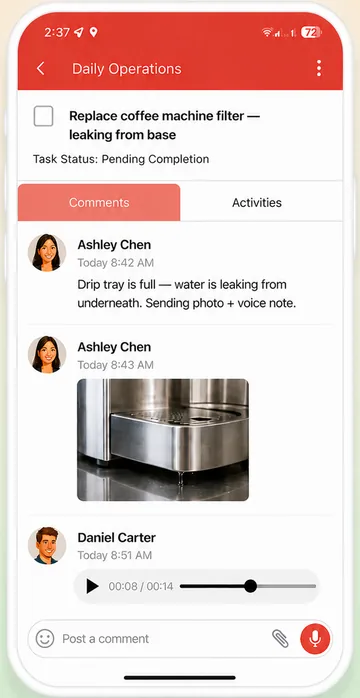
| Photos as proof | Required photo fields in forms (Advanced), camera-only option, GPS stamps | Photos in task comments, checked by the verifier; no required-photo rule |
| Voice | Voice messages in chat, transcribed; speech-to-text in forms | Voice messages on tasks; voice quick add |
| AI | AI for forms, updates, courses, scheduling, chat and automations; none inside its tasks that we could find | Doo AI for tasks, on every plan |
Connecteam is a trademark of its owner. WeGoDoo is not connected to Connecteam. Connecteam facts come from its own pricing page and help centre, checked 12 November 2026; prices and features change, so check their site for the latest. WeGoDoo prices from its pricing page, checked 12 November 2026.
Where Connecteam is strong
If you need more than tasks, it does a lot.
One app for the whole operation
Time clock, scheduling, chat, HR and training as well as tasks.
Proof-of-work forms
Required photos, camera-only uploads, GPS stamps and signatures.
Free for small teams
Up to 10 users get every hub at no cost.
One price for up to 30
Each hub has a flat price for the first 30 users.
Where WeGoDoo is different
Just tasks, nothing else to set up
Lists, tasks and ticks. No hubs or modules to choose, so your team starts on day one.
A check on any task, free
Add a verifier to any task on every plan. Read more about task verification.
Repeats and reminders on the free plan
Daily, weekly, monthly or custom repeats, with reminders, on every plan.
Voice and AI for the tasks themselves
Voice messages on tasks, voice quick add, and Doo AI for adding, assigning and planning.
More ways teams use WeGoDoo
Questions about Connecteam and WeGoDoo
Does WeGoDoo have a time clock or shift scheduling?
No. WeGoDoo is only for tasks. If you need a time clock or rotas, Connecteam or a scheduling app is the better fit, and you can use WeGoDoo alongside it for the daily tasks.
Can WeGoDoo require a photo before a task is done?
No. Photos are optional and go in the task's comments. To make sure work is checked, add a verifier: the task stays Pending Verification until they sign it off.
Is WeGoDoo free for my team?
The free plan has 3 lists with up to 50 people in each, with no time limit. Pro and Business raise the limits. See the pricing page.
Does it work on phones and computers?
Yes. WeGoDoo has apps for iPhone and Android, and the same lists work in any web browser.
Keep it simple: just the tasks, done and checked.
Start free with one shared list and add a verifier to the jobs that matter.
Start free