
Simple task management for small business teams
Assign tasks to your employees, see what's done without asking, and keep every conversation with the task it's about. There's nothing to set up before you start.
Free plan available · iPhone, Android and web


You shouldn't be the one who remembers everything
In a small business, the owner often ends up as the to-do list. Everyone asks you what's next, and nothing moves until you answer. Tasks get handed out in passing, on calls and on WhatsApp, and the evening goes on checking what got done.
WeGoDoo moves all of that out of your head and into shared lists. Each task has one owner and a due date, your team sees what's theirs, and you can see where things stand without asking.
Everything a small team needs, nothing it doesn't
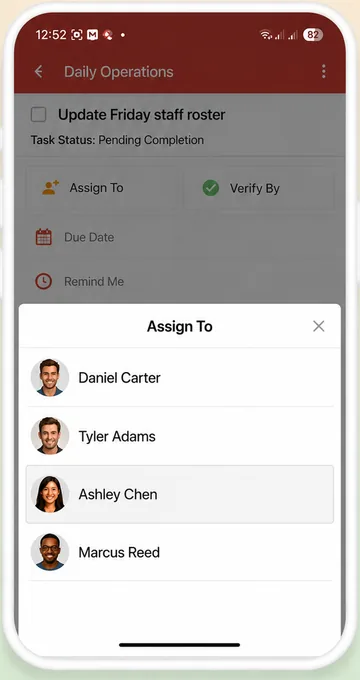
Assign in two taps
Pick a teammate in Assign to. Everyone sees who's responsible, and each person can filter their own tasks with Assigned to me.
Know it's really done
Add a verifier to the tasks that matter. Read more about task verification.
Talk where the work is
Comments, @mentions, photos, files and voice messages stay with the task, not in a chat that scrolls away.
See the whole picture
Search across every list by person, status, due date or tag.
Let Doo AI do the typing
Say what needs doing and Doo AI adds the tasks, assigns your team and sets the dates.
Connect your other tools
Zapier, Pabbly, Make, webhooks and an API connect WeGoDoo to the apps you already use.
Who uses WeGoDoo
Small teams that need things done, not a project management course.
Shops and retail
Opening routines, deliveries, restocking and displays, with photo proof.
Cafés and restaurants
Opening, closing and cleaning checklists. See restaurants.
Hotels
Housekeeping, maintenance and shift handovers. See hotels.
Cleaning and maintenance
Repeating jobs for every site and client. See cleaning.
Offices and agencies
Client work, follow-ups, payments and reports, checked by a second person before they go out.
“Thanks to WeGoDoo's task verification feature, our team at Swan Sweets Pvt Ltd is more accountable than ever. An essential app for any business!”
When the team grows
Up to 50 people per list
Share a list by e-mail address, and make someone an admin to help you run it.
One bill for the team
On the Business plan, an admin adds and removes users and pays for the whole team in one place.
How to get started: How to add your team to WeGoDoo
More ways teams use WeGoDoo
Questions from small business owners
How do I add my employees?
Share a list by entering each person's e-mail address, and they can join even if they don't have an account yet. On the Business plan, an admin can also add and remove users for the whole team.
Can employees see each other's tasks?
In a shared list, yes: everyone sees every task, whoever it's assigned to. For private work, use a separate list, or your own Inbox, which is never shared.
Does it work with the apps we already use?
Yes. WeGoDoo connects to Zapier, Pabbly and Make, and it has webhooks and an API for anything else.
Can my team use it on their phones?
Yes. WeGoDoo works on iPhone, Android and the web, and every change syncs across them.
How much does it cost?
There's a free plan with 3 lists and up to 50 people in each list. Pro and Business raise the limits and include more AI credits, and Business adds team admin and one bill. See the pricing page.
Take the to-do list out of your head.
Create a shared list, invite your team and assign the first tasks today.
Start free