
The restaurant task app your staff will actually use
Opening and closing checks, deep cleans, stock counts, supplier calls: put each routine in a shared list, give every task an owner and a time, and see what got done, with a photo when it matters.
Free plan available · iPhone, Android and web


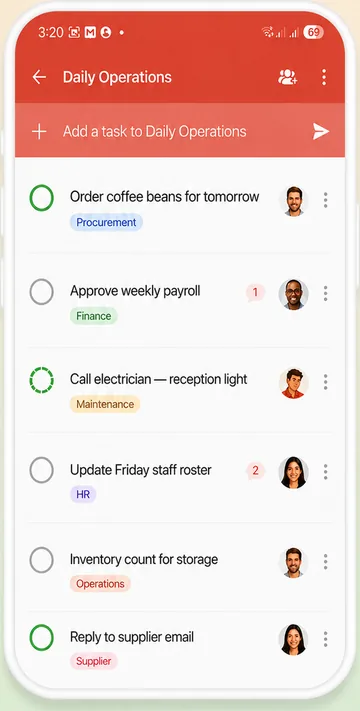
Shifts change. The checklist shouldn't.
In a restaurant the work repeats every day, but the people doing it change with every shift. The opening checklist is taped to a wall, the closing checks live in someone's head, and the rest happens in a WhatsApp group that has scrolled away before service starts. When something is missed, nobody is sure who had it.
WeGoDoo keeps every routine in a shared list on everyone's phone. Each task has one owner, a time and, for the checks that matter, a second person who signs it off.
How restaurant teams use WeGoDoo
Three steps. You can set up tomorrow's opening tonight.
-
Make a list for each routine
Opening, closing, cleaning, prep: one shared list each. Write it yourself, or describe it and let Doo AI draft the checklist for you.
-
Give each task an owner and a time
Assign tasks to the people on shift, set a reminder, and make daily jobs repeat, so nobody has to type them again tomorrow.
-
See it done
Staff tick tasks off as they go and can add a photo of the clean grill or the stocked fridge. For the important checks, add a verifier who signs them off.
Step-by-step guide: How do repeating tasks work?
Built for the way a kitchen works
One list per shift or station
Everyone in a shared list sees every task, so the evening team knows exactly what the morning team left.
Jobs that come back by themselves
Set a task to repeat daily, weekly or monthly. When it's ticked off, the next one appears with the next date.
Photo proof and sign-off
Add a verifier, and the task waits as Pending Verification until they check it. Read more about task verification.
Talk on the task, not in a group chat
Comments, photos and voice messages stay with the task they're about. Type @ to bring someone in.
Add tasks by voice
Busy hands? Tap the microphone and say the task. Doo AI fills in the date and the person for you to check.
Each person's shift in one place
Staff add their tasks to Doing This Today and start the shift knowing what's theirs.
Example: an opening checklist
A shared list like this takes a couple of minutes to set up. Each line is a task with its own owner, reminder and repeat.
- Check fridge and freezer temperaturesTyler
- Set up the coffee machine and grinderAshley
- Restock the bar and the coffee stationAshley
- Prep station check: sauces, garnishes, labelsMarcus
- Clean and check the restroomsTyler
- Count the float and open the tillDaniel
- Brief the team on today's specialsDaniel
Set each task to repeat daily, and add a verifier to the ones you want checked.
“Thanks to WeGoDoo's task verification feature, our team at Swan Sweets Pvt Ltd is more accountable than ever. An essential app for any business!”
Need the checklist first?
Write it in seconds with our free AI tools, then run it with your team in WeGoDoo.
More ways teams use WeGoDoo
Questions from restaurant owners
Can my staff use WeGoDoo on their phones?
Yes. WeGoDoo works on iPhone, Android and the web, and every change syncs across them.
How many people can share a list?
Up to 50 people per list, on every plan. The free plan includes 3 lists.
Can a checklist repeat every day?
Yes. Set Repeat to Daily, or weekly, monthly, yearly or a custom pattern. When a task is completed, the next one is created with the next date, so a late tick doesn't shift the schedule.
Can I see that a task was really done?
Yes. Add a verifier to the task. When your staff complete it, it waits as Pending Verification until the verifier checks it, and a photo in the comments shows the result.
Do my staff get reminders?
Yes. Set Remind me on a task. In a shared list, everyone in the list gets the reminder on their phone at that time.
Is there a free plan?
Yes. The free plan has 3 lists, 100 open tasks per list and up to 50 people in each list, with no time limit. Pro and Business raise the limits. See the pricing page.
Run tomorrow's opening from WeGoDoo.
Create your first shared list in a couple of minutes and invite your team.
Start free