
Stop running your team's tasks on WhatsApp
Keep WhatsApp for chatting. Put the work in WeGoDoo: every task with an owner, a due date and its own conversation, so nothing gets lost in the scroll.
Free plan available · iPhone, Android and web


Why WhatsApp groups fail as a to-do list
WhatsApp is a great messaging app. It just wasn't built to track work.
Tasks scroll away
An instruction sent at 9 is buried by lunchtime under photos, replies and “ok”.
Nobody owns the task
A message to the group is a message to no one. Everyone thinks someone else has it.
No due dates or reminders
The group won't remind anyone that the supplier needs a call by 3.
You can't see what's done
To find out, you scroll back, or you ask again.
Work mixed with everything else
The team's tasks sit between family chats, forwards and good-morning messages.
What changes with WeGoDoo
Every task has an owner
Assign each task to one person. Everyone can see who has it, and each person filters their own with Assigned to me.
Due dates and reminders
Give a task a date and a reminder time. In a shared list, everyone in the list gets the reminder on their phone.
Each task keeps its own conversation
Comments, photos, files and voice messages sit on the task they're about. Type @ to call someone in.
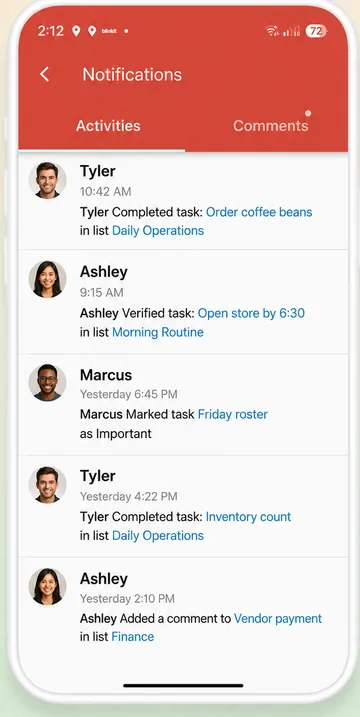
See what's done at a glance
Open, done and waiting for a check, sorted and filtered. No scrolling back through the chat.
Turn a WhatsApp message into tasks
Paste a message into Doo, and Doo AI suggests the tasks for you to confirm.
Still need to post in the group?
Select tasks and press Send to copy them as a tidy list, ready to paste into WhatsApp.
WhatsApp group or WeGoDoo?
Use each for what it does best.
| WhatsApp group | WeGoDoo | |
|---|---|---|
| Quick chats and calls | Yes, it's made for this | Comments on each task, but no calls |
| Voice notes and photos | Yes | Yes, attached to the task |
| An owner for each task | No | Yes |
| Due dates and reminders on tasks | No | Yes, with repeats |
| See what's still open | Scroll back and ask | One list, with filters |
| A second person checks the work | No | Yes, with task verification |
| Work kept apart from personal chats | Same app as family chats | Yes |
WhatsApp is a trademark of WhatsApp LLC. WeGoDoo is not connected to WhatsApp.
How to move your team over
You don't need to move everything. Start with this week.
-
Make one shared list
Call it what the group is about, such as Daily Operations, and invite the team by e-mail address.
-
Move this week's tasks
Paste the last few messages into Doo and confirm the tasks it suggests, or add them yourself, each with an owner and a date.
-
Agree one rule
If someone has to do it, it goes in WeGoDoo. Everything else can stay on WhatsApp.
Step-by-step guide: How to share a list with your team
More ways teams use WeGoDoo
Questions about moving off WhatsApp groups
Do we have to stop using WhatsApp?
No. Keep it for chatting and quick calls. Move only the tasks, the things someone has to do by a certain time, into WeGoDoo.
Will my team find it hard?
WeGoDoo is built to be simple: a list, a task, a tick. Comments and voice messages work much like a chat.
Can I turn a WhatsApp message into tasks?
Yes. Copy the message, paste it into Doo and ask it to add the tasks. Doo shows you a preview, and nothing is added until you confirm.
Can I share tasks back to the WhatsApp group?
Yes. In a list, choose Select, pick the tasks and press Send. WeGoDoo makes a tidy text list you can copy and paste into WhatsApp.
Does everyone need the app?
Everyone who gets tasks needs a WeGoDoo account, and the free plan is enough. You invite people by e-mail address, even if they haven't signed up yet.
Is there a free plan?
Yes. The free plan has 3 lists, 100 open tasks per list and up to 50 people in each list, with no time limit. Pro and Business raise the limits. See the pricing page.
Keep the chat. Move the work.
Make one shared list for your team and move this week's tasks into it.
Start free