
A hotel task app your staff can use from day one
Rooms to turn, repairs to log, handovers between shifts: WeGoDoo puts them in shared lists your team already knows how to use. No training days and no complicated setup.
Free plan available · iPhone, Android and web


A hotel runs on a hundred small jobs
Room 204 needs towels. The AC in 310 is noisy. The night shift found a leak. Most of it gets passed on by phone, on paper or in a WhatsApp group, and every shift starts by asking what happened.
With WeGoDoo, each job is a task with an owner. Housekeeping, maintenance and the front desk each get a shared list, and anyone on shift can see what's open, what's done and what's waiting for a check.
Where WeGoDoo helps in a hotel
Start with one department, then add the rest.
Housekeeping
Room checklists that repeat every day, a photo when a room is ready, and a supervisor who signs it off.
Maintenance
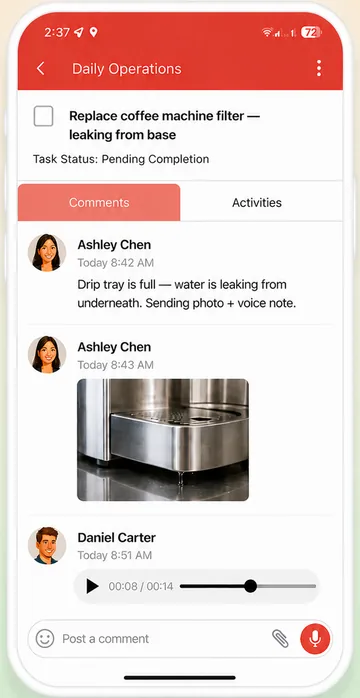
Staff report a problem with a photo or a voice message. The job gets an owner, and everyone sees when it's fixed.
Front desk and handovers
Open tasks stay in the list with every comment, so the next shift sees what's left.
Restaurant and kitchen
Opening and closing checklists for the hotel restaurant. See WeGoDoo for restaurants.
Made for hotel teams
Easy for every member of staff
A list, a task, a tick. If your team can send a message, they can use WeGoDoo.
Voice messages and voice input
Staff who'd rather talk than type can leave a voice message on a task, or say a new task instead of typing it.
Checked, not just ticked
Add a verifier, and a room or repair waits as Pending Verification until a supervisor checks it. Read more about task verification.
Repeats and reminders
Daily room checks, weekly deep cleans and monthly maintenance come back on schedule, with a reminder at the time you set.
Shifts that hand over cleanly
Each task's activity history shows who did what and when, so nobody has to remember.
Room for the whole team
Up to 50 people per list. On the Business plan you add and remove staff and pay for everyone in one place.
Example: a room turnover checklist
Make it once as a shared list, then let it repeat for every shift.
- Strip the beds and remake them with fresh linen
- Clean and restock the bathroom
- Dust surfaces and wipe switches and handles
- Restock tea, coffee and water
- Check the AC, lights and TV
- Vacuum and mop
- Post a photo of the finished room for the supervisor
Add the housekeeping supervisor as the verifier, and the room is only done when they've checked it.
Built in a hotel
WeGoDoo started at Hotel Aram, a heritage hotel in Jamnagar, Gujarat. Our founder, Pranav Bhatt, runs it, and he built WeGoDoo for his own team: people who are great with guests but don't want complicated software, in a business where staff change often.
That's why WeGoDoo is simple on purpose. If it needs a training day, it's too complicated.
Need the checklist first?
Write a handover or a standard procedure in seconds with our free AI tools, then run it in WeGoDoo.
More ways teams use WeGoDoo
Questions from hotel owners and managers
Do my staff need training?
WeGoDoo was built for a hotel team that didn't want complicated software, so it stays simple: lists, tasks and ticks, on the phone they already carry.
Can housekeeping send a photo when a room is ready?
Yes. Staff add a photo to the task's comments, and in the phone app they can take it with the camera without leaving the task. Add a verifier, and the room waits as Pending Verification until a supervisor checks it.
Can maintenance jobs repeat?
Yes. Set a task to repeat daily, weekly, monthly, yearly or on a custom pattern. The next one is created when the current one is completed.
How do I add my whole team?
Share a list by entering each person's e-mail address, up to 50 people per list. On the Business plan, an admin can also add and remove users and manage billing for the whole team.
Is there a free plan?
Yes. The free plan has 3 lists, 100 open tasks per list and up to 50 people in each list, with no time limit. Pro and Business raise the limits. See the pricing page.
Give every shift the same clear list.
Set up housekeeping or maintenance first. It takes a couple of minutes, and your team can join from their phones.
Start free