
A cleaning and maintenance checklist app with photo proof
Cleaning rotas, deep cleans, safety checks and repairs: give every job an owner and a schedule, and see a photo of the result before you sign it off.
Free plan available · iPhone, Android and web


Done should mean clean
When the work happens across sites and shifts, you can't check every room, floor or machine yourself. Paper checklists get lost, and a ticked box doesn't show you the result.
WeGoDoo gives each job an owner and a schedule, and lets your team show the finished work with a photo. You check it once, from wherever you are.
How it works
Set it up once. After that, the jobs come back by themselves.
-
Set up the routine
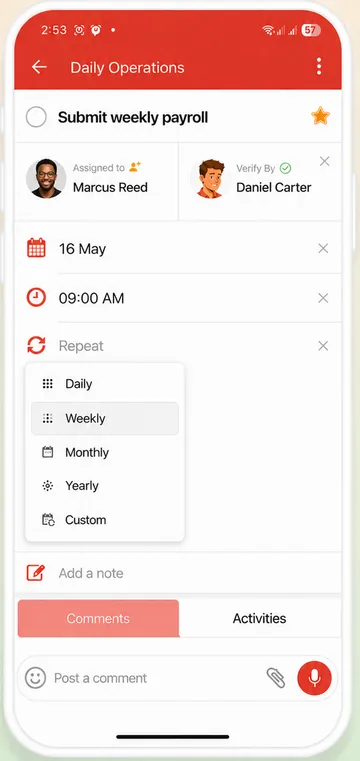
Make a shared list for each site or client. Add the jobs, set them to repeat daily, weekly or monthly, and add a reminder.
-
Your team does the job and shows it
They post a photo of the finished work in the task's comments, or a voice message if something needs fixing, and mark it complete.
-
Sign it off or send it back
The verifier checks the photo and verifies the task. If something's missing, Mark as In-complete sends it back to the person who did it.
Step-by-step guide: How to add a verifier to a task
Why cleaning and maintenance teams use it
Schedules that run themselves
The next job is created when the current one is completed, with the next date on the schedule. Missed jobs don't pile up.
A photo of every finished job
Photos sit on the task, so you can see the result before you verify it. Read more about task verification.
Report a problem by voice
A broken tap or a damaged floor? Your team leaves a voice message of up to 3 minutes on the task, with a photo.
One list per site or client
Everyone in a shared list sees every task in it, so give each site its own list and share it only with the people who work there.
A record for your clients
Each task's activity history shows who did the job, who checked it and when.
Each person's route for the day
Staff add their jobs to Doing This Today and work through them one by one.
Example: a weekly office deep clean
One shared list for the client, repeating every week. Each line is a task with its own owner.
- Vacuum and mop all floors
- Wipe desks, handles and light switches
- Clean and restock the kitchen
- Clean and restock the restrooms
- Empty the bins and replace the liners
- Report anything broken, with a photo
- Lock up and set the alarm
Add yourself or a supervisor as the verifier, and the clean is only done when it's been checked.
Need the checklist first?
Write the procedure or the task list in seconds with our free AI tools, then add the jobs to WeGoDoo.
More ways teams use WeGoDoo
Questions about cleaning and maintenance checklists
Can I make a photo required before a task is completed?
Not as a rule in the app: photos are optional, and your team adds them in the task's comments. To make sure work is checked, add a verifier. The task then stays Pending Verification until they sign it off.
Can I keep each client's jobs separate?
Yes. Give each client or site its own list. Everyone in a shared list sees every task in it, so share each list only with the people who work there.
Do repeating jobs pile up when they're missed?
No. The next one is created only when the current one is completed, and its date follows the schedule, so a late tick doesn't move the plan.
Can my team report a problem by voice?
Yes. They can leave a voice message of up to 3 minutes on the task. The free plan allows 3 voice messages and 3 attachments a day; Pro raises that to 100 each.
Is there a free plan?
Yes. The free plan has 3 lists, 100 open tasks per list and up to 50 people in each list, with no time limit. Pro and Business raise the limits. See the pricing page.
Know every job is done, and done right.
Set up your first site or client as a shared list, and add a verifier to the jobs that matter.
Start free