
A Todoist alternative for small teams
Todoist is one of the best to-do apps for getting your own work in order. If you run a team and need tasks assigned, checked and talked about in one place, WeGoDoo is built for that, and its team plan costs less.
Free plan available · iPhone, Android and web


The short answer
Choose Todoist if…
You mostly plan your own work, want apps for every device, including Windows, Mac and Apple Watch, or use a lot of integrations.
Choose WeGoDoo if…
You run a small team and want a second person to check finished work, the whole team on one free list, an AI assistant that knows your team's tasks, and a lower price for the team.
WeGoDoo and Todoist side by side
The things small teams ask about most.
| Todoist | WeGoDoo | |
|---|---|---|
| Made for | Individuals first, with a team plan | Small teams that run daily work |
| Free plan | 5 personal projects with up to 5 people each; one free team to try, full team features on Business | 3 lists, up to 50 people in each list |
| Price for one person | Pro: $7 a month, or $5 a month billed yearly | Pro: $4 a month, or $3 a month billed yearly |
| Price for a team | Business: $10 per user a month, or $8 billed yearly | Business: $6 per user a month, or $5 billed yearly |
| Assign tasks | Yes, one person per task, every plan | Yes, every plan |
| A second person checks the work | None that we could find | Yes: a verifier signs off the task, every plan |
| Photos as proof | Photos in comments | Photos in comments, checked by the verifier |
| Voice messages on tasks | Audio comments, every plan (not in the Mac app) | Voice messages up to 3 minutes (Free: 3 a day) |
| Add tasks by voice | Ramble on every plan (up to 10 sessions a month on Free), in about 40 languages | Voice quick add on web and phone |
| AI | Todoist Assist: smart filters, capture from text, photos and files, voice; more on Pro | Doo AI: answers questions about your tasks and makes changes, plus Plan My Day and Catch Me Up; credits on every plan |
| Apps | Web, Windows, Mac, Linux, iPhone, iPad, Android, Apple Watch, Wear OS | Web, iPhone and Android |
Todoist is a trademark of its owner. WeGoDoo is not connected to Todoist. Todoist facts come from its own pricing page and help centre, checked 12 November 2026; prices and features change, so check their site for the latest. WeGoDoo prices from its pricing page, checked 12 November 2026.
Where Todoist is strong
It's a very good app, and for some people it's the right one.
Apps everywhere
Web, Windows, Mac, Linux, phones, tablets and watches.
Fast capture
Natural language, voice with Ramble, and tasks from text, photos and files.
Lots of integrations
More than 90 integrations with other apps.
Personal planning
Filters, views and labels for organising your own work in detail.
Where WeGoDoo is different
Built-in task verification
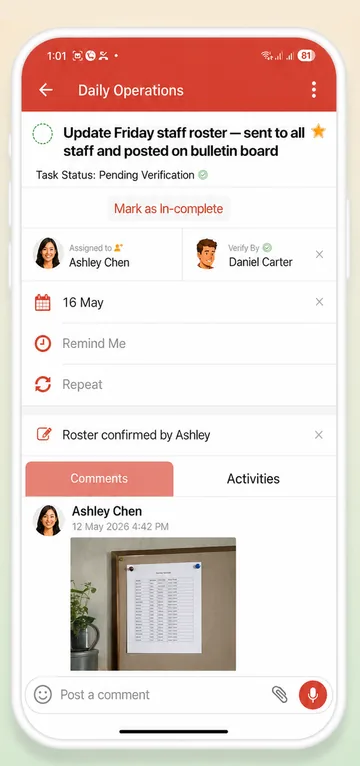
Pick a verifier, and a finished task waits as Pending Verification until they check it. Read more about task verification.
The whole team on one free list
Up to 50 people in each list, on every plan, including Free.
An assistant that knows your team
Ask Doo AI “Who has the most open tasks this week?”, let Plan My Day pick today's work, or catch up on what you missed.
A lower price for the team
Business is $6 per user a month, or $5 billed yearly, with team admin and one bill.
Moving from Todoist
There's no import yet, so most teams start with this week's work.
-
Make a shared list
One list per team or routine. Invite people by e-mail address, even if they haven't signed up yet.
-
Bring this week's tasks
Paste them into Doo, which suggests them as tasks for you to confirm, or add them by voice.
-
Add checks where they matter
Give the important tasks a verifier, so they only count as done once they're checked.
Step-by-step guide: How to share a list with your team
More ways teams use WeGoDoo
Questions about switching from Todoist
Is there a free plan?
Yes. The free plan has 3 lists, 100 open tasks per list and up to 50 people in each list, with no time limit. Pro and Business raise the limits. See the pricing page.
Can I import my tasks?
Not yet: WeGoDoo has no import. Paste a list of tasks into Doo and it suggests them as tasks for you to confirm, or start fresh with this week's work.
Does WeGoDoo understand dates in plain English?
Yes, once AI features are turned on. Type “Call the bakery tomorrow at 9am, remind me” and WeGoDoo fills in the date and the reminder, then shows you a card to check before the task is added.
How many people can share a list?
Up to 50 people per list, on every plan.
Does WeGoDoo work on Windows or Mac?
Yes, through the web app in any browser. There are phone apps for iPhone and Android.
Bring your team into one list.
Start free, invite your team and add a verifier to the tasks that matter.
Start free