
A Trello alternative for small teams that run on lists
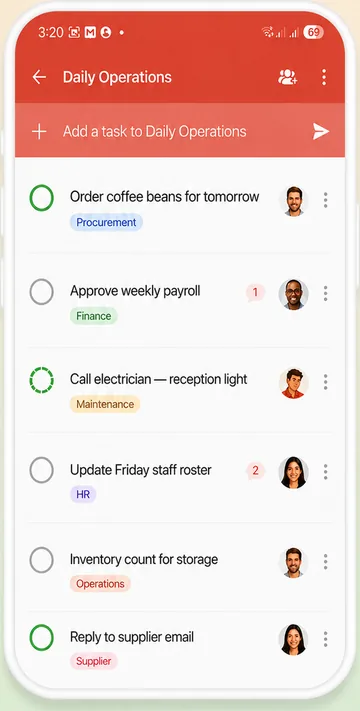
Trello is great when work moves across a board, card by card. If your team runs on daily lists, like opening checks, jobs and errands, WeGoDoo keeps it simpler: tasks with an owner, a date and a check when it matters.
Free plan available · iPhone, Android and web


The short answer
Choose Trello if…
You like visual boards, plan projects in stages, or want automation rules and Power-Ups.
Choose WeGoDoo if…
Your team works from daily lists, you want a second person to check finished work, more than 10 people on the free plan, and AI on every plan, including Free.
WeGoDoo and Trello side by side
The things small teams ask about most.
| Trello | WeGoDoo | |
|---|---|---|
| Made for | Visual boards for projects and workflows | Daily task lists for small teams |
| How work is shown | Boards of cards, plus Inbox and Planner; more views on Premium | Lists of tasks, plus Doing This Today for each person |
| Free plan | Up to 10 collaborators and 10 boards per Workspace | 3 lists, up to 50 people in each list |
| Price for a team | Standard: $6 per user a month, or $5 billed yearly | Business: $6 per user a month, or $5 billed yearly |
| Assign tasks | Yes, several people per card | Yes, one owner per task |
| A second person checks the work | Not built in; third-party Power-Ups | Yes: a verifier signs off the task, every plan |
| Photos as proof | Attachments on cards (10 MB per file on Free) | Photos in comments, checked by the verifier (25 MB per file) |
| Repeating tasks | Recurring due dates, a Card Repeater Power-Up and automation | Daily, weekly, monthly, yearly or custom repeats |
| Voice | Siri adds cards on iPhone | Voice quick add on web and phone, and voice messages on tasks |
| AI | On Standard and above, not on Free | Doo AI on every plan, with monthly credits |
| Connect AI assistants | Trello MCP on every plan | Claude, on Pro and Business |
| Apps | Web, iPhone, Android, Mac and Windows | Web, iPhone and Android |
Trello is a trademark of its owner. WeGoDoo is not connected to Trello. Trello facts come from its own pricing page and help centre, checked 12 November 2026; prices and features change, so check their site for the latest. WeGoDoo prices from its pricing page, checked 12 November 2026.
Where Trello is strong
For some teams it's the better choice.
Visual boards
See work move from stage to stage, with more views on Premium.
Automation and Power-Ups
Rules that move cards for you, and add-ons for almost anything.
Capture from anywhere
Send email, Slack or Teams messages into the Inbox, or use Siri on iPhone.
A generous free plan
10 boards, unlimited cards and 250 automation runs a month.
Where WeGoDoo is different
Lists made for daily work
No boards to design. Each task is one line with an owner, a date and a status, so new staff get it straight away.
Built-in task verification
A verifier signs off finished work, on every plan. Read more about task verification.
Room for the whole team on Free
Up to 50 people in each list, so a team of 15 or 30 can start free.
Voice and AI on every plan
Add tasks by voice, leave voice messages on tasks, and use Doo AI on the free plan too.
More ways teams use WeGoDoo
Questions about switching from Trello
Does WeGoDoo have boards?
No. WeGoDoo uses lists: each task is one line with an owner, a date and a status. If you need a Kanban board, Trello is the better fit.
Is WeGoDoo free for a team of 15?
Yes. The free plan allows up to 50 people in each list, with 3 lists in total.
Does WeGoDoo have automation?
WeGoDoo has repeating tasks, reminders and Doo AI, and it connects to Zapier, Pabbly and Make, with webhooks and an API. It has no built-in rule builder like Trello's.
Can I import my tasks?
Not yet: WeGoDoo has no import. Paste a list of tasks into Doo and it suggests them as tasks for you to confirm, or start fresh with this week's work.
Does it work on my phone?
Yes. WeGoDoo has apps for iPhone and Android and works in any web browser, and every change syncs across them.
Swap the board for a list your team will use.
Start free, make one shared list and invite your team.
Start free